
Pass customer context to an AI chatbot for ecommerce
Let a signed-in order page provide the current order ID, prove the connector uses it, replace it when the visitor switches orders and secure the production pattern.
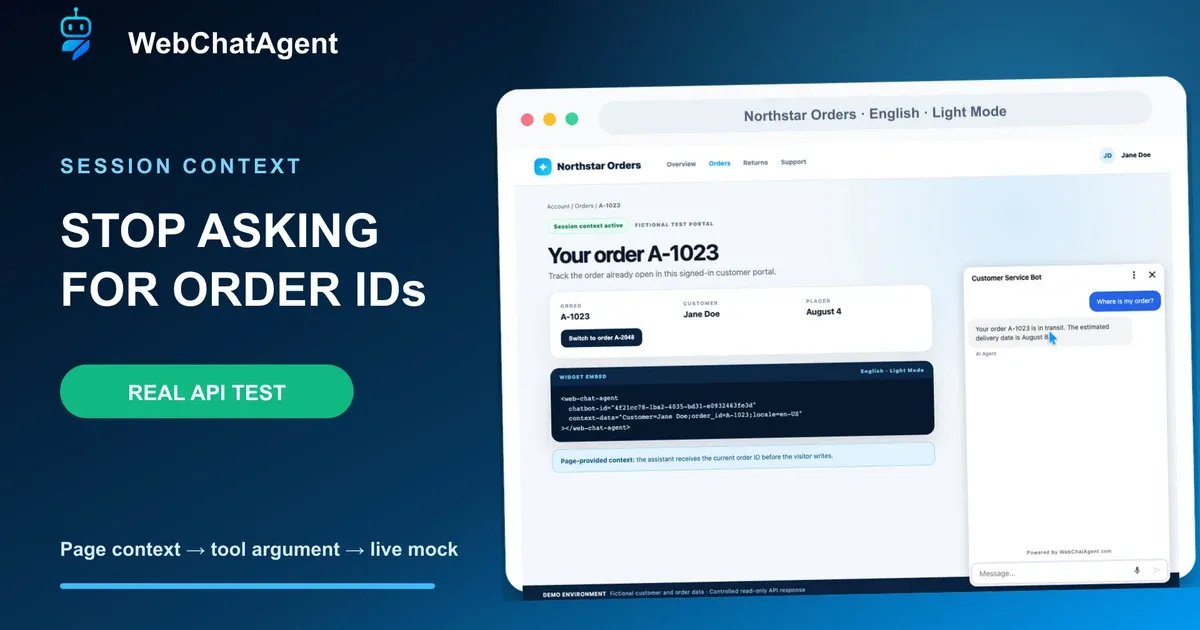
To pass customer context to an AI chatbot safely, let the page select the current record while a server-authorized API remains the source of truth.
A signed-in ecommerce page already knows which customer and order the visitor is viewing. Session context lets that page pass a small set of current values to the assistant, so the visitor can ask “Where is my order?” without typing the order ID again.
This tutorial uses the fictional Northstar Orders portal, the real WebChatAgent widget and a controlled DummyJSON HTTP endpoint. The page supplies `order_id`; a read-only API Connector supplies the fictional status and ETA. No real customer, shipment, shop, payment account or credential is involved.
You will prove three separate states: no context asks for an ID, `A-1023` automatically becomes the connector argument, and a runtime event replaces it with `A-2048`. You will also compare the HTML attribute, JavaScript global, runtime event, WordPress interfaces and white-label aliases.
Browser context improves convenience but is not authentication. The production pattern restricts allowed domains and passes a short-lived opaque token that your API validates server-side before returning the smallest necessary response.
Privacy-protected two-click player
AI Chatbot for Ecommerce: It Knows the Order Before You Ask
Pass customer and order context to an ecommerce AI chatbot, update it at runtime and use it safely as a verified API Connector argument.
The YouTube player stays blocked until you choose Play. Loading it connects your browser to YouTube and may transfer technical data to Google.
Open directly on YouTubeWhat you will have at the end
- A verified no-context baseline
- A `context-data` embed that supplies the current order
- A real read-only connector result for A-1023
- A runtime replacement that uses only A-2048 next
- Implementation options for JavaScript, WordPress and white label
- A production checklist based on domains, opaque tokens and server validation
Before you start
- A non-production WebChatAgent assistant with API Connector access
- An English Light Mode test page on an allowed domain
- One read-only mock endpoint with fictional data
- Access to the widget embed code or WordPress placement
- A written baseline, original-context and replacement-context expectation
- For production: a backend that can issue and validate short-lived opaque tokens
Page context selects the record; the API supplies the truth
The embedding page sends a flat key-value record with each chat request. Matching keys can satisfy required API Connector fields, but they do not become permanent knowledge. The connector still performs the live HTTP request and its response remains authoritative for status and ETA.
A `webchatagent:context` event replaces the complete current record. Replacement prevents an old order ID from silently surviving beside a new one. Clear the context with an empty object or `null` when the visitor signs out.
Treat every browser value as editable input. Domain restrictions control where the widget loads; a signed, short-lived or opaque token plus server-side authorization controls which private record may be returned.
01–08
Set it up step by step
Create one read-only order-status connector
The context key and required connector field must use the same exact name.
Create the connector on a dedicated TEST assistant. Use GET and the controlled endpoint `https://dummyjson.com/http/200/Order_{order_id}_is_in_transit_eta_August_8`. Add one required Text field named `order_id`; the placeholder and field name must match character for character.
Tell the tool to run only for the fictional order-status question, to use the exact current `order_id` from visitor context and to return only order ID, normalized status and ETA. The endpoint is a public mock, not a shop integration. Never place a production token or customer record in the connector prompt.
- Method: GET only
- Required field: `order_id`
- Data: fictional DummyJSON mock
Record the baseline without context
The assistant must ask for the missing order ID and must not invent a status.
Embed the widget without `context-data`, open a fresh conversation and ask exactly: “Where is my order?” Although the portal visibly shows A-1023, the widget cannot read arbitrary page text and should ask for the order ID.
Stop if the response already says A-1023, in transit or August 8. That indicates stale conversation state, leaked prompt data or an unsafe guess. Clear the conversation and browser context before continuing.
Pass A-1023 with the context-data attribute
Use a flat, small record that contains only values needed in this session.
For a server-rendered page, add `context-data="Customer=Jane Doe;order_id=A-1023;locale=en-US"` to `<web-chat-agent>`. Semicolon-separated pairs and a flat JSON object are supported; nested objects are not a substitute for a dedicated backend request.
The normalized record allows at most 20 keys, 64 characters per key, 500 per value and 4,000 serialized characters in total. Use stable machine keys such as `order_id`, avoid secrets and keep presentation labels such as Customer optional.
Prove A-1023 reaches the connector
The same question now returns the status without asking for the ID again.
Start a new context-enabled conversation and repeat “Where is my order?” The assistant should use A-1023 for the required `order_id` tool argument, call the GET endpoint and answer that the fictional order is in transit with ETA August 8.
The proof combines three observations: the embed contains A-1023, the connector URL contains the `{order_id}` placeholder and the live mock response contains A-1023 plus the status text. Context selects the record; the endpoint response supplies the status.
Replace context after login or navigation
The runtime event replaces the complete record while the widget stays open.
When the visitor switches to A-2048, dispatch `new CustomEvent('webchatagent:context', { detail: { Customer: 'Jane Doe', order_id: 'A-2048', locale: 'en-US' } })`. Do this only after the page state and authorized session agree on the new record.
Replacement is deliberate: omitted keys disappear instead of lingering. On logout, dispatch an empty object or `null`. Do not merge old customer and order values in application code unless that behavior is explicitly required and tested.
Verify only A-2048 is used next
The next connector call must not reuse the old order ID from chat history.
Keep the widget open and ask: “What is the status of the order now shown on this page?” The next answer must contain A-2048 and the mock status, and it must not mention A-1023.
Save this three-state test as a regression: missing context, original context and runtime replacement. Repeat it after connector, system prompt, model, widget or host-application changes. Record question, current context, tool argument, endpoint response and timestamp.
Choose attribute, global, event or platform integration
All supported entry points normalize to the same current visitor context.
Use the HTML attribute for server-rendered values. Set `window.webchatagentContext` before the asynchronous widget script when JavaScript owns the initial session. Use `webchatagent:context` for login, logout, account, cart, product or route changes after load.
In WordPress, use the `webchatagent_context_data` filter for centrally generated values or `[webchatagent_inline context-data="order_id=A-1023"]` for an inline placement. White-label clients use `window.chatWidgetContext` and the `chat-widget:context` event with identical replacement semantics.
Secure the production lookup
Browser context is editable input, never proof of customer identity.
Restrict `allowedDomains` to exact production and staging hosts. Do not authorize an order lookup because context contains a customer name, email or order number; a visitor can change each value in DevTools.
Have your backend issue a short-lived opaque token for the signed-in session, pass only that token as context and let the connector call a least-privilege read endpoint. The endpoint validates token, customer ownership, expiry and requested scope server-side, then returns only order ID, status and ETA. Revoke or expire the token on logout.
Example & result
See the practical test and its result
Every tutorial includes a fixed input, the expected outcome and a transparent record of what was actually verified locally.
Practical example: Pass customer context to an AI chatbot for order tracking
This exact scenario was completed with the temporary tutorial account.
Exact test input
Ask “Where is my order?” first without context and then with `order_id=A-1023`. In the same context-enabled widget, dispatch `webchatagent:context` with `order_id=A-2048` and ask for the order now shown.
Expected result
Without context, the assistant asks for an order ID. With context, the connector uses A-1023 and returns in transit with ETA August 8. After replacement, the next answer uses A-2048 and does not mention A-1023.
What was actually verified
The isolated English Light Mode run passed all three states against the controlled DummyJSON mock. The baseline requested the missing ID; the original context produced A-1023, in transit and August 8; the runtime replacement produced A-2048 with no A-1023 in the newest answer. The connector contract required `order_id`, and final cleanup reported exactly 0 tutorial users.
Tips & tricks
Make the setup reliable
Test with realistic examples, record your baseline and change one setting at a time. That makes real improvements visible.
Keep keys stable across page and connector
Use one documented machine name such as `order_id` everywhere. A small spelling or casing change prevents automatic field reuse.
Separate convenience from authorization
Context can select what the visitor is looking at. Only your backend can decide what the signed-in visitor may read or change.
Clear context on logout
Dispatch an empty object or null before the next visitor can use the widget, and start a new conversation when account ownership changes.
When something does not work
Troubleshooting
Check status, permissions and test data systematically before changing the model or prompt.
The bot still asks for the order ID
Check the final rendered `context-data`, exact `order_id` spelling, script load order and allowed domain. Start a fresh conversation so an old missing-context turn cannot confuse the comparison.
The connector receives the old order
Confirm the runtime event fires after the page switch and replaces the full detail object. Clear stale application state and verify the visible card plus emitted payload both say A-2048.
The assistant names a status without a tool result
Stop rollout. Tighten the system role, keep the status out of context and prompt, and require the read-only connector for every order-status answer.
Private order data is visible after editing the browser value
Treat this as an authorization defect. Remove direct ID-based access, require a short-lived server-validated token, rotate exposed credentials and audit the endpoint logs.
Ready for a production-style test
Use the published video as a walkthrough, then replace the mock URL in production with a read-only endpoint that validates an opaque session token. Rerun all three context states and add the results to your release regression suite.
Related resources
CRM chatbot integration
Use customer context with an owned CRM and strict authorization boundaries.
Connect a chatbot to a REST API
Build and validate the read-only connector used by this context pattern.
Widget context developer reference
Check current interfaces, aliases, replacement behavior and limits.