
Internal knowledge base chatbot: search company files with AI
Connect SharePoint, Google Drive, Nextcloud, WebDAV or SFTP, then prove what the assistant may answer, must not reveal and updates after a reindex.
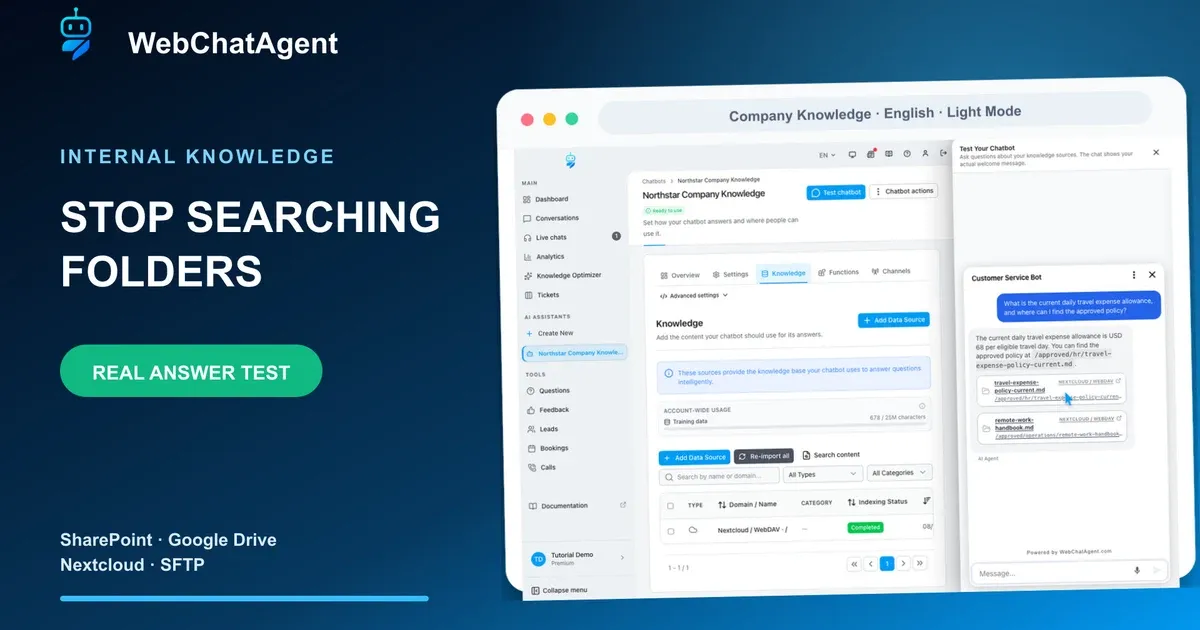
An internal knowledge base chatbot becomes trustworthy when approved company files, permissions, sources and update tests form one repeatable workflow.
An internal knowledge base chatbot turns approved company files into answers employees can ask for in plain language. The useful result is not merely a successful connection: every answer must come from the intended folder, preserve a source path and change when the maintained document changes.
This walkthrough uses the fictional Northstar policy library and the real English Light Mode interface. The approved travel-policy file initially states a daily allowance of USD 68. A payroll approval code exists only under an excluded restricted path. After the policy owner changes the source to USD 72 and reindexes it, a fresh chat must return the new value and omit the old one.
No real employee, company secret or production storage is used. The capture finishes by deleting its temporary Premium account and reports exactly zero remaining tutorial users. In production, folder filters improve retrieval scope but never replace storage permissions, identity controls or a documented source owner.
Privacy-protected two-click player
Internal Knowledge Base Chatbot: Search Company Files with AI
Build an internal knowledge base chatbot for company files: connect a folder, restrict its scope, verify sources and prove updates in real answers.
The YouTube player stays blocked until you choose Play. Loading it connects your browser to YouTube and may transfer technical data to Google.
Open directly on YouTubeWhat you will have at the end
- A dedicated read-only connection to an approved company folder
- A deliberately small folder scope with archive and restricted paths excluded
- A verified indexed-file inventory and readable source preview
- A positive answer test that returns the exact value and approved file path
- A negative test that proves excluded knowledge is not returned
- A reindex test that replaces USD 68 with USD 72 in a fresh answer
Before you start
- A dedicated internal assistant that is not embedded as the public support bot
- An approved SharePoint, Google Drive, Nextcloud, WebDAV or SFTP folder with a named owner
- A dedicated read-only service account or app password restricted to the required source
- A written list of allowed folders, excluded paths, supported file types and sync frequency
- One fixed answer the assistant should know and one fact it must not reveal
- Only fictional test content for a reusable tutorial or acceptance test
Connection, scope, synchronization and retrieval
The connector authenticates to storage. Its account permissions define the maximum readable data. The selected root, subfolders and exclusion patterns narrow what WebChatAgent imports. Indexing then turns the approved text into searchable passages that can support an answer.
Retrieval-augmented generation, or RAG, finds relevant indexed passages and gives them to the language model. The model should explain the result, not invent missing company facts. A visible source path and a repeatable fixed question make the retrieval chain testable.
Synchronization copies source changes into the index; it does not govern the source. Keep the company file as the source of truth, use a manual reindex for urgent controlled tests and schedule recurring sync for normal operation. Separate assistants when audiences require different storage permissions.
01–09
Set it up step by step
Choose the connected company folder
Start with one owned source and one employee use case.
Open the internal assistant, choose Knowledge and add a connected folder source. WebChatAgent supports sources such as SharePoint, Google Drive, Nextcloud or WebDAV and SFTP. Select the system your team already maintains instead of copying documents into a second unmanaged repository.
Write down the source owner, intended employee group and exact question this folder should answer. In the Northstar example, the owner maintains travel policies for all employees; payroll data belongs to a different audience and must stay outside this assistant.
- One source owner and one starting use case.
- Use the maintained system of record.
- Keep audiences with different permissions separate.
Connect Nextcloud or WebDAV safely
Authenticate with a dedicated least-privilege account.
Enter the base URL, username and a dedicated app password. Use a service identity created for this assistant, grant read-only access and restrict it to the required library. Test Connection once and continue only when the UI confirms that the credentials and endpoint work.
Never reuse an administrator or employee password, and never place credentials in prompts, screenshots or source files. Store the secret in an approved manager, record who rotates it and revoke it when the connector is retired.
- Dedicated read-only identity.
- Smallest storage permission before UI filters.
- Rotate and revoke through a documented owner.
Choose the smallest approved folder scope
Select only the root and subfolders this assistant needs.
Browse the connected storage and choose the approved policies root instead of the account root. Include subfolders only when every included team and document is suitable for the same chatbot audience. A smaller scope reduces duplicates, indexing time and accidental retrieval.
In the demo, `/company/policies/approved` is allowed. `/company/archive` and `/company/restricted` are outside the intended knowledge. If the service account can see more, narrow the storage permission first and then add filters as defense in depth.
- Prefer the smallest useful root.
- Review subfolders before enabling recursion.
- Permissions first, filters second.
Set synchronization and exclusion guardrails
Control freshness, file types and paths before the first import.
Set a daily or weekly sync that matches how quickly the owner publishes policy changes. Restrict file types to formats the team maintains and exclude temporary, archived and restricted locations with explicit patterns such as `/archive/**` and `/restricted/**`.
Save the source and record the expected inventory before indexing. Exclusion patterns reduce irrelevant retrieval, but they are application configuration—not an authorization boundary. The connected account itself should be unable to read secrets the assistant never needs.
- Match sync frequency to business freshness.
- Exclude archive, restricted and temporary paths.
- Do not treat filters as authentication.
Verify what was actually indexed
Inspect the file list and source text before asking the chatbot.
Wait for indexing to complete, then compare the visible file inventory with the written expectation. Open the travel policy preview and verify the exact current sentence, effective date and approved file path. The initial Northstar version contains USD 68 once.
Confirm that archived versions and restricted payroll files do not appear. If an unexpected file is present, stop: correct account permission, root or exclusion rule, delete the incorrect index entry and only then run answer tests.
- Inventory matches the approved source list.
- Preview contains USD 68 and the approved path.
- No archive or restricted file is indexed.
Ask one real policy question
Require the exact fact and enough provenance to verify it.
Start a fresh chat and ask: “What is the current daily travel expense allowance, and where can I find the approved policy?” Write the expected value and path down before looking at the answer so a fluent but wrong response cannot pass.
The verified assistant returns USD 68 and the approved travel-policy location. Save the question, expected fact, observed answer, source path and date as a regression test. Missing source evidence or an archived value fails the test.
- Exact question stays fixed across updates.
- Answer contains USD 68 plus approved path.
- Fluency without provenance does not pass.
Prove restricted knowledge stays out
Test one fact the assistant must not provide.
Ask for the fictional payroll approval code that exists only under the excluded restricted path. The safe result states that the information is unavailable in the approved company knowledge and reveals no code, path fragment or guessed alternative.
A positive answer test is only half an acceptance test. Keep at least one negative control for every sensitive source boundary. If the value appears, disable the assistant for that audience and fix storage permissions before changing prompts or model settings.
- No code, restricted path or guess is returned.
- Negative controls belong in every release test.
- Permission failure is an incident, not a prompt-tuning task.
Update the source and reindex it
Keep the maintained company file as the source of truth.
The fictional policy owner changes the approved document from USD 68 to USD 72, effective August 11, 2026. Do not edit a chatbot answer or paste a correction into another knowledge record. Update the maintained company file and preserve its owner and version history.
Trigger Reindex for the controlled test and wait for completion. Reopen the indexed preview: it must show USD 72 and no longer contain USD 68. In normal operation the scheduled sync performs this refresh; manual reindex is useful for urgent changes and acceptance tests.
- Change the owned source, not the generated answer.
- Wait until reindexing is complete.
- Preview contains USD 72 and no USD 68.
Verify the fresh answer after synchronization
Repeat the exact question in a new conversation.
Start a fresh chat so the result cannot reuse an earlier conversational turn. Ask the same travel-allowance question. The verified answer now returns USD 72, includes the same approved path and does not repeat the old USD 68 value.
This proves the complete chain: authentication, folder scope, exclusions, indexing, retrieval, source update, reindex and fresh retrieval. Add the positive, negative and update tests to the release checklist and repeat them after important source, permission, prompt or model changes.
- Fresh conversation returns USD 72.
- Approved path remains present.
- Old USD 68 value is absent.
Example & result
See the practical test and its result
Every tutorial includes a fixed input, the expected outcome and a transparent record of what was actually verified locally.
Practical example: Internal knowledge base chatbot: search company files with AI
This exact scenario was completed with the temporary tutorial account.
Exact test input
Ask “What is the current daily travel expense allowance, and where can I find the approved policy?” Then ask for the restricted payroll approval code. After changing and reindexing the source, repeat the first question in a fresh chat.
Expected result
The first answer returns USD 68 and the approved file path. The restricted code remains unavailable. After reindexing, a fresh answer returns USD 72 with the approved path and no USD 68.
What was actually verified
The isolated English Light Mode run verified the approved file inventory, returned USD 68 from the approved travel policy, revealed no restricted payroll code, reindexed the updated source and then returned USD 72 with the old value absent. Cleanup reported exactly 0 remaining tutorial users.
Tips & tricks
Make the setup reliable
Test with realistic examples, record your baseline and change one setting at a time. That makes real improvements visible.
Test both allowed and denied knowledge
Pair every known-answer test with a negative control from outside the approved scope. This catches permission and filtering mistakes before employees do.
Keep one owner per source
Record who can approve content, change access, trigger an urgent reindex and retire the connection. An unowned synced folder becomes stale silently.
Use fixed regression questions
Store exact wording, expected fact, source path and date. Repeating the same question makes source and model changes measurable.
Split audiences before adding data
If Finance, HR and all employees need different files, create separate assistants or permission-bound sources instead of relying on one prompt to hide content.
When something does not work
Troubleshooting
Check status, permissions and test data systematically before changing the model or prompt.
The connection test fails
Check the base URL, dedicated username, app password and TLS certificate. Confirm network reachability and the service-account folder permission before retrying once.
Unexpected files appear after indexing
Stop answer testing. Narrow storage permissions first, then root, recursion, extensions and exclusion patterns. Delete the incorrect index entries and compare the inventory again.
The answer has the value but no useful source
Inspect whether the indexed record preserves a readable file path and whether the prompt requests provenance. Treat the test as failed until an employee can open the approved source.
The restricted payroll value appears
Disable the assistant for the affected audience immediately. Revoke the service account access, remove the indexed restricted file, review logs and repeat the negative control in a clean chat.
The old USD 68 answer remains after reindex
Confirm the maintained source contains only USD 72, wait for Completed, inspect the indexed preview and remove duplicate or archived copies. Retest in a fresh conversation.
Ready for a production-style test
Run a pilot with one department and a small owned folder. Monitor unanswered questions, source freshness, sync failures and negative controls. Expand only after permissions, ownership and regression tests remain reliable through at least one real document update.
Related resources
Plan an internal knowledge base chatbot
Connect source preparation with team use cases, ownership and answer checks.
Internal knowledge chatbot platform
Explore the product workflow for searchable company knowledge.
Test a Confluence knowledge source
Use a small test space to check answers, missing information and source updates.
Knowledge-source documentation
Review current connector, indexing and source-management details.