
RAG chatbot knowledge base: prepare company documents
Turn scattered pages and PDFs into a small, owned source set whose important facts are easy to retrieve, verify and update.
To prepare a reliable RAG chatbot knowledge base, start with approved, extractable company documents whose stored passages and answer boundaries are tested directly.
A chatbot does not read a knowledge base like a colleague who remembers the whole folder. It usually receives a few retrieved passages. If a passage says “this applies for 30 days” but the product, start date and exceptions live elsewhere, the answer can be incomplete even though the original document looked clear to a human.
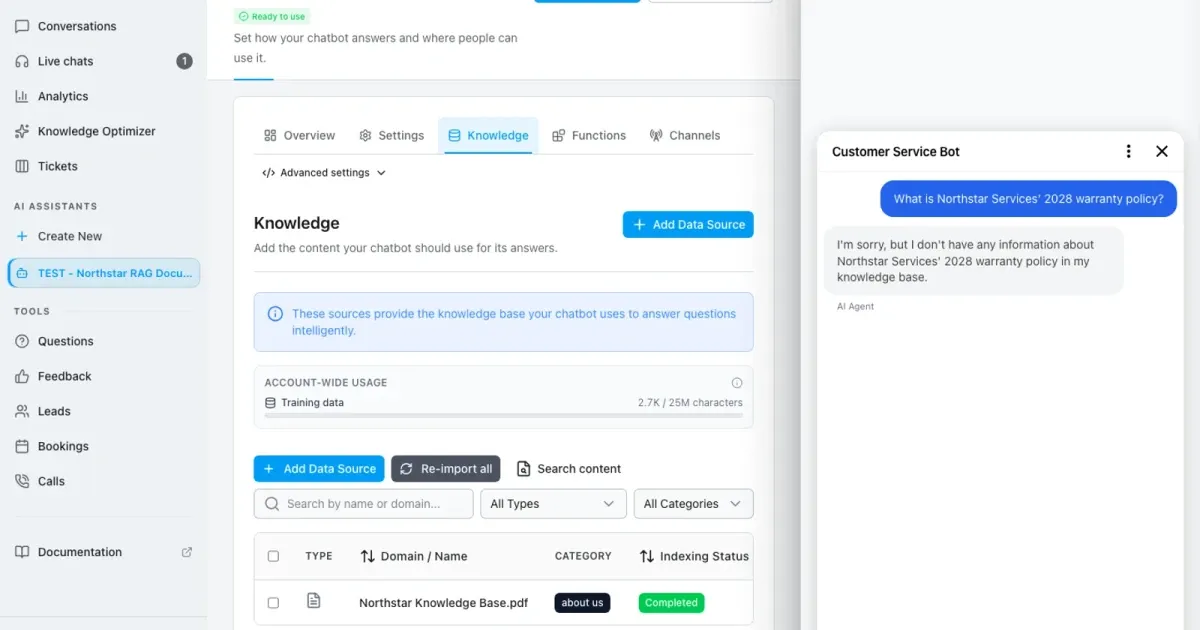
This guide starts before upload. You will choose one approved source for each topic, rewrite important facts so they stand on their own, verify OCR and extraction, then prove the indexed result with one known-answer question and one intentionally unanswered control question. The Northstar demo PDF supplies the unique fact NORDSTERN-42, so the result cannot be confused with general model knowledge.
Do not upload a whole shared drive just because it is available. A smaller current collection with owners, review dates and repeatable questions is easier to trust than a large archive with contradictory versions.
Privacy-protected two-click player
RAG Knowledge Base Best Practices: Fix Your Chatbot Sources
Prepare a RAG chatbot knowledge base: remove duplicate documents, improve extraction, inspect indexed text and test known and missing answers.
The YouTube player stays blocked until you choose Play. Loading it connects your browser to YouTube and may transfer technical data to Google.
Open directly on YouTubeWhat you will have at the end
- A source register with one accountable owner and review date per topic
- Retrieval-friendly pages and documents with self-contained facts
- OCR-checked, deduplicated and clearly versioned source files
- An indexed WebChatAgent source whose stored text is visibly verified
- A repeatable known-answer and missing-information release test
Before you start
- Access to the approved source files and public pages, not only exported copies
- A content owner who can resolve contradictions and approve the current version
- The downloadable fictional Northstar demo PDF or another non-sensitive test document
- Five to ten real user questions, including at least one question the sources should not answer
- An isolated WebChatAgent test assistant with English interface and Light Mode
Retrieval works with passages, so local context matters
The technical term is Retrieval-Augmented Generation (RAG): the system first searches the connected source set for relevant passages. Only those passages and the question normally reach the answer model. A useful passage therefore names its subject, rule, conditions, exception and effective date without depending on “the table above” or an unexplained abbreviation.
Preparation has three separate quality gates. Source governance decides which version is authoritative. Extraction quality checks what text the index actually received. Answer evaluation tests whether realistic questions retrieve the right evidence and whether missing evidence produces a safe limitation instead of a guess.
01–11
Set it up step by step
Remove redundant, obsolete and trivial content
Delete conflicts from the active set instead of trying to outrank them.
Group near-duplicates by topic. Typical duplicates are a current article plus a print view, an old PDF beside a new PDF, parameterized website URLs, exported workspace copies and translations that repeat the same facts. Compare their effective dates and approval state, then keep only the approved version in the chatbot source set.
Archive superseded material outside the connected folder or crawl scope. Search Priority can influence ranking later, but it is not a safe fix for contradictory policies. A stale document remains retrievable even when its weight is lower.
Do not delete the business archive
Remove obsolete copies from the chatbot’s active source set. Preserve records according to your legal and retention policy in the proper archive.
Rewrite important facts as self-contained sections
Keep the subject, rule, conditions and date close together.
Replace generic headings such as “General” or “More information” with the question the section answers: “Support hours for Northstar customers” or “Annual-plan cancellation eligibility”. Keep one main topic per section and use short paragraphs under a real heading hierarchy.
Write explicit sentences. “It is available for 30 days” becomes “The Northstar onboarding review is available for 30 calendar days after the kickoff date.” Add exceptions and the effective date in the same section. Avoid references such as “see above”, because the retrieved passage may not contain the referenced text.
Normalize names, dates, units and abbreviations
Use the words visitors actually type and explain specialist terms once.
Write the full term on first use, for example “Service-level agreement (SLA)”. Keep product and plan names consistent across sources. If visitors say “refund” while the policy says “reimbursement”, include both terms naturally in the section.
Use unambiguous dates such as “1 August 2026” or an ISO date in structured fields. Attach currencies and units to every number. State the timezone for hours and deadlines. A bare “50” is not a usable fact when it could mean euros, percent, items or minutes.
Convert complex tables and images into retrievable text
Do not let color, cell position or a screenshot carry the only copy of a rule.
Simple tables with one header row and one fact pattern per row are easier to extract. Split merged cells, repeat the row subject where needed and add a short paragraph that states the conclusion a visitor may ask about. For a comparison table, include product, condition, price and effective date in each relevant row.
Add text alternatives for diagrams and screenshots. A screenshot of opening hours is not a knowledge source until those hours also exist as readable text. Keep decorative images, signatures and navigation outside the answer-bearing content when possible.
Run OCR and check the extracted reading order
A PDF can look perfect while exposing broken or empty text to the index.
Try selecting and copying a sentence from every page type. If the page is a scan, run optical character recognition before upload. Review codes, dates, decimal separators, accented names and page headers manually; these are common OCR failure points.
Paste the copied text into a plain-text editor and read it without the page layout. Check multi-column order, table rows, hyphenated line breaks and repeated headers. Re-export a clean accessible PDF when extraction mixes columns or drops essential labels. The demo control fact must remain exactly `NORDSTERN-42`.
OCR is a draft, not proof
A successful OCR job only means text was produced. Compare the produced text with the approved original before indexing it.
Upload the clean document with understandable metadata
Make the source recognizable in filters, conversations and later reviews.
Open the isolated assistant, choose Data Sources and select Add Data Source → Documents. Upload the approved Northstar demo PDF. Set the document name to “Northstar Knowledge Base” and the category to “Support” so a reviewer can identify its purpose without opening the file.
Leave AI optimization off for a clean, selectable-text document unless you have a specific extraction problem and will review the transformed result. Wait until the row shows Completed. Record the indexed character or chunk count as a baseline, not as a quality score.
Inspect indexed text, metadata and Search Priority
Review what retrieval can actually see, not only the original PDF.
Open Edit for Northstar Knowledge Base. Read the stored extracted text around the first heading, one table or list, the final section and NORDSTERN-42. Confirm that the editor still shows the intended Document Name and Category.
Keep Search Priority at 0 unless repeatable retrieval tests show a justified conflict. A higher value boosts a source relative to others; it does not repair bad OCR, missing context or an obsolete rule. Save only verified corrections, and keep the approved source file as the maintained original.
Search the index for the unique control fact
Separate extraction and indexing problems from answer-generation problems.
Choose Content Search and search for `NORDSTERN-42`. The matching result should name Northstar Knowledge Base and show the stored passage containing the fact. Repeat with one ordinary phrase such as “support hours” to make sure retrieval is not limited to an unusual code.
If the unique fact has no result, stop before changing the model or system prompt. Recheck source status, extracted text and the selected assistant. If Content Search finds the passage but the chatbot answer fails, investigate question wording, competing sources, role instructions and model behavior.
Run a known-answer test and a safe unknown test
A useful release test proves both correct retrieval and honest limits.
Start a fresh Test chatbot conversation and ask: “What is the support verification code in the Northstar Knowledge Base? Answer in one sentence and name the source.” The expected answer contains exactly NORDSTERN-42 and identifies the PDF. Record the actual wording, source version, model and date.
Start another fresh conversation and ask for Northstar’s 2028 warranty policy. The demo source intentionally has no answer. Passing means the assistant says the information is unavailable instead of inventing a duration or condition. Keep both questions in the release set after every source, prompt or model change.
Version, re-index and review the source on a schedule
Treat the knowledge base as a maintained product, not a one-time upload.
When an owner approves a change, update the maintained source, effective date and register entry together. Re-index or replace the WebChatAgent source, confirm Completed, recheck the changed passage in Content Search and rerun the fixed question set.
Remove the superseded source from the active assistant only after the new version passes. Watch Questions, Feedback and Conversations for real wording that the test set missed. Add a question when it represents a recurring user need, then review critical topics on their documented cadence.
Example & result
See the practical test and its result
Every tutorial includes a fixed input, the expected outcome and a transparent record of what was actually verified locally.
Practical example: Chatbot knowledge base: prepare company documents
This exact scenario was completed with the temporary tutorial account.
Exact test input
Search the indexed document content for the exact control value NORDSTERN-42.
Expected result
Content Search finds NORDSTERN-42 in the approved Northstar knowledge-base document.
What was actually verified
The real Light Mode run uploaded and indexed the structured Northstar PDF. Content Search then returned NORDSTERN-42 from Northstar Knowledge Base.pdf, exactly as shown in the evidence frame.
Tips & tricks
Make the setup reliable
Test with realistic examples, record your baseline and change one setting at a time. That makes real improvements visible.
Prefer maintenance over optimization tricks
A source that an owner can understand and update reliably is safer than a one-off transformation nobody can reproduce later.
Attach questions to source owners
Give every critical topic a known-answer question, a safe unknown and an owner who reviews failures.
Separate languages deliberately
Choose whether one approved source language should answer multilingual questions or whether each locale has its own maintained source. Avoid accidental duplicate translations.
Measure changes with the same model
Keep model, prompt and question wording fixed while evaluating a source rewrite. Otherwise you cannot attribute the result to the knowledge-base change.
When something does not work
Troubleshooting
Check status, permissions and test data systematically before changing the model or prompt.
The uploaded PDF shows Completed, but the control fact is missing from Content Search
Open the stored text and compare it with the original. Check OCR, reading order and whether the correct assistant received the file. Re-export and replace the source instead of changing the model.
Content Search finds the passage, but the chatbot answers with an older rule
Search the full active source set for duplicate wording, print URLs, translations and old files. Remove the obsolete copy, re-index, start a fresh conversation and rerun the identical question.
Table values lose their labels after extraction
Replace merged or visual-only layouts with a simple header row, repeat the row subject and add a short text summary. Verify the stored text before testing answers.
The known answer passes only sometimes
Use fresh conversations, identical wording and one unchanged model. Inspect competing sources and retrieved passages before increasing Search Priority. Record several runs rather than keeping the best one.
The assistant invents an answer to the unknown control question
Confirm that no active source contains a similar claim, then strengthen the evidence and missing-information rules in the role. Retest the known and unknown questions together so safety does not suppress useful answers.
Ready for a production-style test
Publish the source register and content standard as part of the release process. Require an owner, approval state, effective date, review date, known-answer question and safe unknown for every critical source.
Related resources
Plan an internal knowledge base chatbot
Connect source preparation with team use cases, ownership and answer checks.
Upload and index a website plus PDF
Follow the beginner flow from an empty assistant to two grounded answers.
Understand every Data Sources control
Review statuses, categories, stored text, Content Search, re-indexing and deletion.
Regression-test the finished knowledge base
Turn repeatable questions into Knowledge Test and Audit checks.
Handle missing evidence safely
Pair source quality with explicit answer boundaries and negative tests.