
How to index an entire website for an AI chatbot
Plan, crawl and verify a complete website without importing account areas, search pages, navigation noise or duplicate URLs.
To index an entire website for a chatbot reliably, define the exact useful page inventory first and prove both extracted content and answers after the crawl.
A complete website is rarely the same thing as every URL a crawler can discover. Search results, account screens, cart routes, print views, tag archives and translated duplicates can consume quota while making answers less reliable. The safe goal is a complete set of useful public pages.
This guide uses a fictional Northstar support site with a small, documented page inventory. You will start with a limited crawl, inspect every indexed URL and its extracted text, remove persistent noise with exclusion patterns, then prove retrieval with fixed questions before enabling automatic re-indexing.
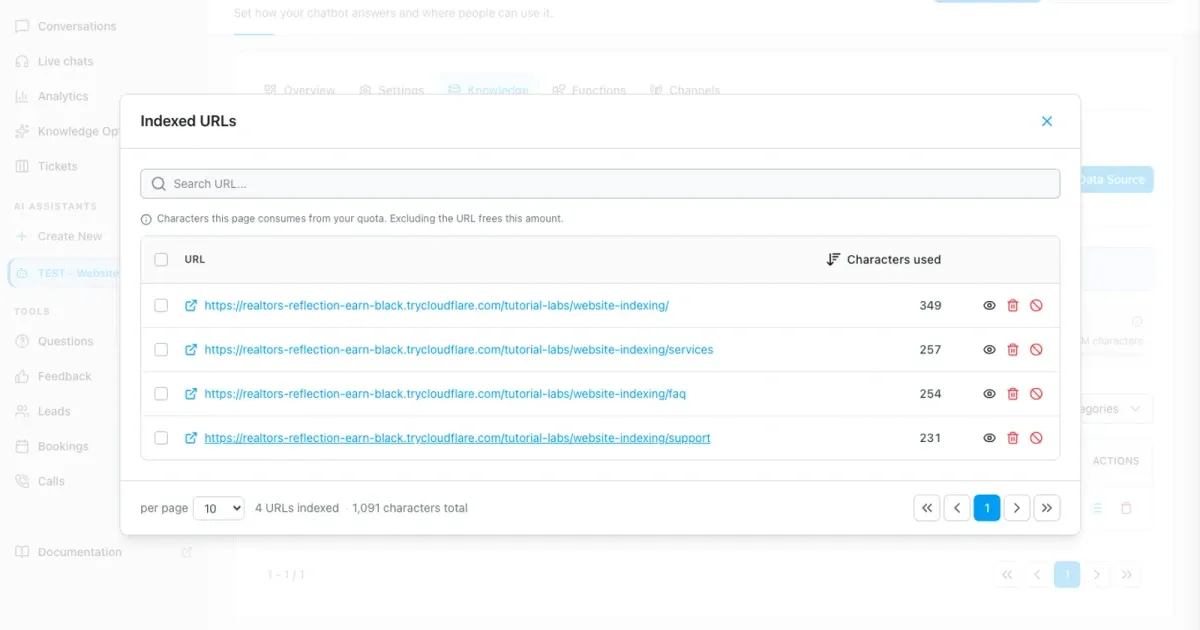
The verified walkthrough crawls exactly four canonical pages, keeps private, search and print variants out, retrieves `two business hours` plus `NORTHSTAR-SITE-42`, refuses to invent a missing 2029 fee and saves a seven-day re-index interval. The temporary account is deleted with zero tutorial users remaining.
Privacy-protected two-click player
Your Chatbot Crawled the WRONG Pages — Fix Website Indexing
Index an entire website for an AI chatbot with controlled crawl depth, CSS selectors, exclusions, URL audits, answer tests and automatic re-indexing.
The YouTube player stays blocked until you choose Play. Loading it connects your browser to YouTube and may transfer technical data to Google.
Open directly on YouTubeWhat you will have at the end
- A written inventory of included, excluded and duplicate URL families
- A controlled website source with tested crawl depth, `main` extraction and exclusions
- A page-by-page audit of indexed URLs, characters and extracted content
- A repeatable known-answer and missing-information regression set
- A refresh interval matched to the content owner instead of an arbitrary schedule
Before you start
- Permission to crawl the exact public hostname and path
- A sitemap or manual inventory of important page templates
- Known account, checkout, search, print, parameter and duplicate-language patterns
- One content owner plus two or more questions with known source-backed answers
- Enough remaining indexed-character quota for the controlled first crawl
Discover broadly, index selectively
Crawl depth controls how many link levels are discovered from the start URL. Zero keeps the run on the entered page; one reaches directly linked pages; an empty field removes the fixed depth limit. Exclusion patterns keep matching pages out of the index while their links can still help discovery.
CSS selectors answer a different question: which part of each accepted page becomes knowledge. A selector such as `main` can remove repeated navigation and footer text, but it must exist across every page template. Status Completed proves processing finished. Indexed URLs and fixed answer tests prove that the right pages and facts are actually usable.
01–09
Set it up step by step
Map the website before opening the crawler
Separate useful pages from discovery-only, private and duplicate routes.
Export the sitemap or list representative URLs manually. Group them as required content, optional content, duplicate variants and prohibited pages. Record the canonical language and whether parameters change the content or only sorting, tracking and presentation.
The fictional Northstar lab expects four useful pages below `/tutorial-labs/website-indexing/`: overview, services, support and FAQ. Private, search and print variants are excluded. The inventory is the test oracle: unexpected pages fail the run even if the source status is green.
- Expected useful pages: 4
- Excluded families: private, search and print
- Canonical language: English
Open Website under the correct assistant
Confirm the assistant, plan, quota and ownership warning before adding a URL.
Open the isolated `Website Crawl Lab` assistant, choose Data Sources, select Add Data Source and then Website. The dialog explicitly says to add only websites you own. Stop if the hostname, path or permission does not match the approved scope.
Check the Training data usage card before the crawl. Record the current character total so growth can be attributed to this source. A stronger model does not compensate for an over-broad or unauthorized crawl.
Set the start path and a bounded first depth
Start small enough that every discovered page can be reviewed.
Enter the stable Northstar lab root and use depth 2 for the first controlled run. Depth 0 would index only the overview. Depth 1 reaches direct links. An empty depth removes the fixed level limit and belongs only in a later run after exclusions are proven.
Stay inside the section root instead of starting on the domain homepage. WebChatAgent scopes discovery to the start path, which makes separate website sources useful when documentation, marketing and support require different selectors or refresh schedules.
Do not use unlimited as a shortcut
First prove page count, exclusions and extraction at a bounded depth. Expand one level at a time and compare the delta.
Keep main content and exclude durable URL noise
Use one selector that exists across templates and explicit case-sensitive patterns.
Expand Advanced. Set the CSS selector to `main` only after checking overview, services, support and FAQ. A selector that is absent on one template can produce an empty page, while a selector that is too broad repeats menus, cookie text and footer links in every chunk.
Add exact exclusion patterns for the lab’s private, search and print variants. Patterns are case-sensitive. Review each one against real URLs; a broad fragment such as `/shop` can unintentionally exclude `/workshop`. Excluded pages stay out of the index, but their links may still be followed for discovery.
- CSS selector: `main`
- Exclude: private path, search route and print query
- Do not exclude legal pages automatically when the bot must answer from them
Start once and read every status correctly
Wait for Completed; stop deliberately when the scope is visibly wrong.
Select Add & Index once. Pending means queued, Processing means pages are still being fetched and extracted, Failed or Error needs the exact reason, and Stopped means a person ended the run. Do not create a second source because the first job looks slow.
If the page count or character total rises far beyond the inventory, use Stop, save the evidence and inspect patterns before retrying with a fresh account. Completed confirms the job ended; it does not yet prove clean content or correct answers.
Audit the indexed URL list and quota
Compare exact URLs and per-page characters with the inventory.
Open Indexed URLs from the website row. The lab must contain exactly the four planned canonical pages. Search for `private`, `search`, `print`, question marks and duplicate trailing-slash variants. Record total characters and compare the delta with the pre-crawl baseline.
Delete removes a selected indexed page now, but a later crawl can rediscover it. Exclude also adds a durable pattern for future crawls. Use Exclude for a URL family that should remain out, then re-index and verify both the list and character total again.
Inspect extracted text from every template
A correct URL can still contain the wrong page regions.
Use View indexed content on one page from every template. Confirm that the heading, conditions, dates and unique fact remain together. Search for repeated navigation, cookie banners, unrelated footer content and missing sections caused by the selector.
The known Northstar support sentence says the priority response goal is two business hours and carries the verification value `NORTHSTAR-SITE-42`. If that complete sentence is absent, fix extraction before changing the model or prompt.
Prove retrieval and safe missing-information behavior
Run fixed questions in a fresh conversation after indexing completes.
Ask: `What is the Northstar priority support response goal and website verification value?` The expected answer is `two business hours` plus `NORTHSTAR-SITE-42`, grounded in the support page. Then ask for a 2029 cancellation fee that the fixture does not contain. The safe answer must say the information is unavailable and invent no amount.
Repeat the known question with two natural variants. If all variants miss the same fact, return to extracted content and retrieval before comparing models. Keep these exact questions as the regression set for later crawls.
Choose a refresh interval and document the baseline
Refresh as often as the content owner changes the source, then compare like for like.
Edit the website source only after the first clean result. Choose no automatic re-indexing, daily, every three days, every seven days or every thirty days according to current plan availability and the owner’s review rhythm. Daily is not automatically better for static policy pages.
After every selector, exclusion, provider or source change, wait for Completed and rerun the same known and missing-information questions. Log date, depth, page count, indexed characters and outcomes. Investigate unexpected growth before it reaches the plan limit.
Example & result
See the practical test and its result
Every tutorial includes a fixed input, the expected outcome and a transparent record of what was actually verified locally.
Practical example: How to index a complete website correctly
This exact scenario was completed with the temporary tutorial account.
Exact test input
Open the indexed Support page and inspect the extracted `main` content for the response goal and verification value.
Expected result
The stored page text contains “two business hours” and `NORTHSTAR-SITE-42`, without navigation or private-page content.
What was actually verified
The real controlled crawl opened the indexed Support page and showed both values in its extracted content, exactly as shown in the evidence frame.
Tips & tricks
Make the setup reliable
Test with realistic examples, record your baseline and change one setting at a time. That makes real improvements visible.
Split sources by ownership and template
Documentation, marketing and support often need different selectors, exclusions, owners and refresh intervals. Separate roots make failures and quota growth easier to isolate.
Treat query parameters as a measured decision
Keep a parameter only when it produces unique knowledge. Tracking, sorting, search and print variants usually create duplicates; test exact examples before writing a broad pattern.
Do not remove policies by habit
Privacy, shipping, warranty or cancellation pages may be essential to customer answers. Exclude a page because it is irrelevant or duplicated, not merely because it is legal content.
When something does not work
Troubleshooting
Check status, permissions and test data systematically before changing the model or prompt.
Only the start page appears
Confirm the depth is greater than zero, the useful links stay under the start path and the pages are linked with normal URLs. Inspect failed URLs before increasing depth.
A page is indexed but its useful text is missing
Open View indexed content and test the CSS selector on that exact template. Use a shared `main` or template-specific source instead of combining selectors blindly.
Excluded pages return after re-indexing
Delete affects the current index only. Add a precise persistent exclusion, re-index and verify the URL list. Check case and query-pattern syntax.
Character usage grows much faster than page count
Inspect the largest pages for repeated navigation, cookie text, embedded listings and parameter variants. Tighten the selector or split the source before increasing quota.
Completed source still gives a wrong answer
Verify the exact passage in View indexed content, remove conflicting duplicates and rerun the fixed question in a fresh chat. Compare models only after retrieval is consistently correct.
Ready for a production-style test
Keep the four-URL inventory and fixed known/unknown questions as the release baseline. After every selector, exclusion, content or provider change, wait for Completed and compare the new URL list, character total, extracted sentence and both answer results.