
Connect Your Chatbot to Any API: Just Describe What You Want
The hard part of chatbots was never the chatting – it was the wiring. Our new AI setup assistant researches your system's API, walks you through the setup one question at a time and fills in the whole configuration for you. No docs, no developer, no prior knowledge.
A chatbot that answers FAQs is fine. It gets genuinely useful the moment it can look things up: order status, stock, appointments, account data. Until now that step meant reading API documentation, understanding authentication headers and mapping response fields – or paying someone who does. That step is gone. You describe what you want in plain words, and an AI assistant builds the connection with you.
The last technical hurdle just disappeared
No-code builders made creating a chatbot easy years ago. The API connection stayed stubbornly technical: endpoint URLs, bearer tokens, JSON paths. Even "no-code" usually meant a form full of API vocabulary – friendlier, but still a form you can only fill if you already know the answers.
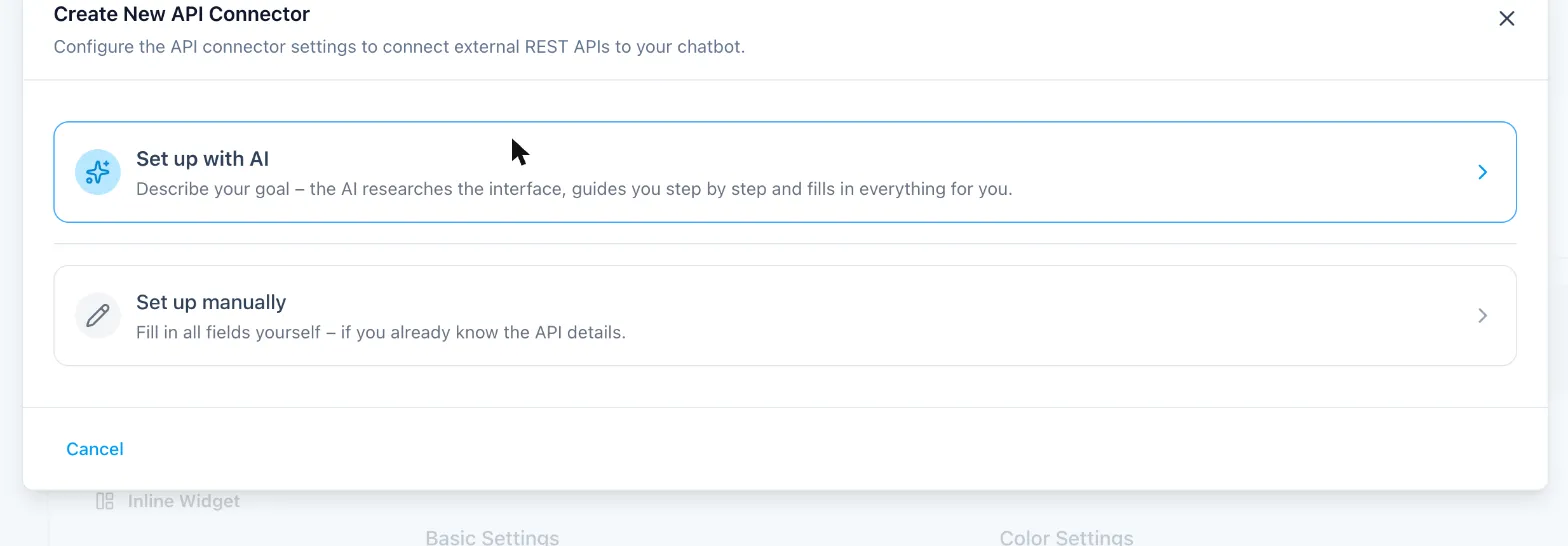
So we handed that form to an AI. When you create a new API connector in WebChatAgent, the first thing you see is a choice:
Describe it. Answer a few questions. Done.
Pick "Set up with AI" and tell it what your chatbot should be able to do – in your own words, in your own language. "Look up the order status in my WooCommerce shop" is enough. From there:
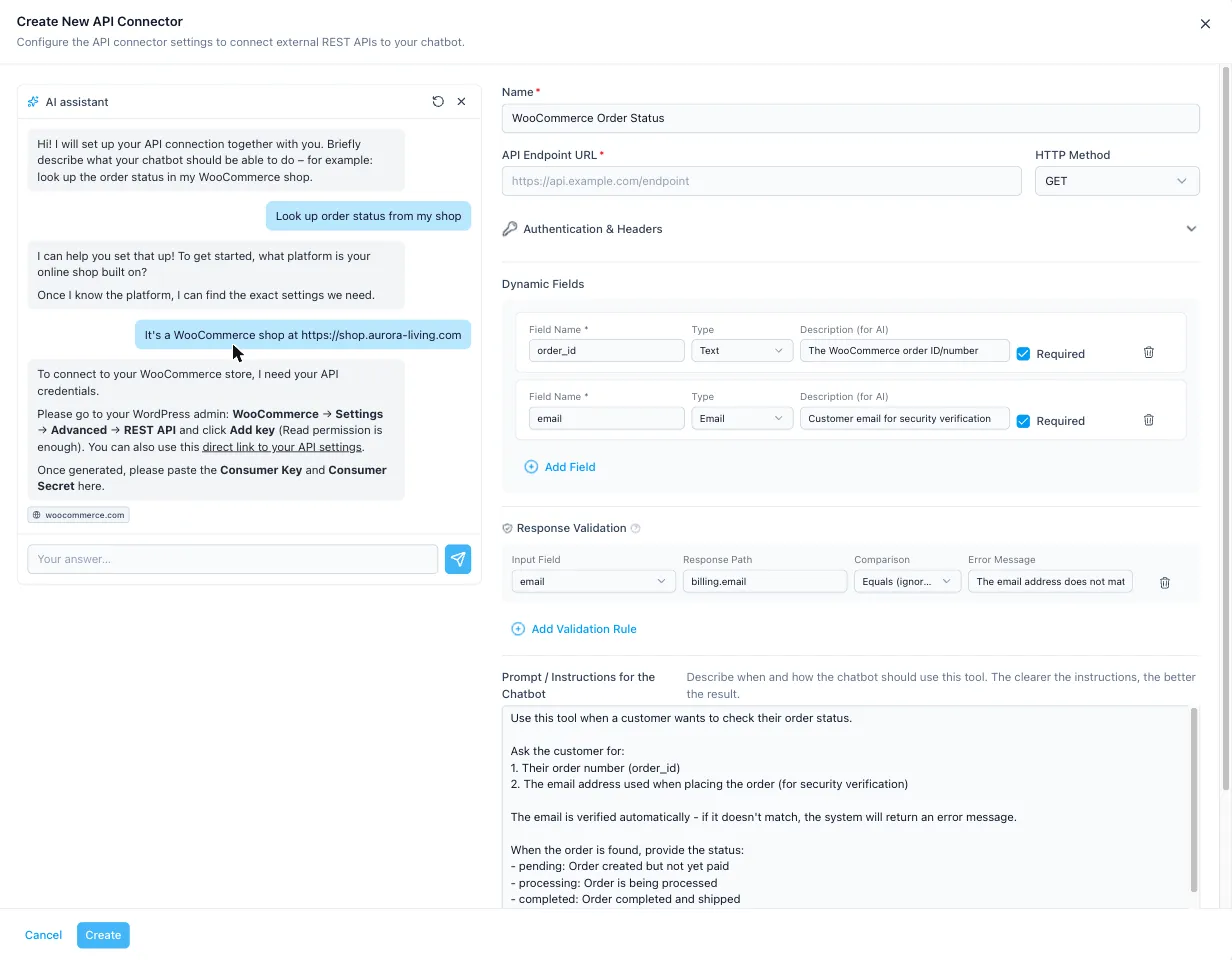
- The assistant researches your system itself. It searches the live web for your platform's API documentation – endpoints, authentication, response fields. You never open a docs page.
- It asks one question at a time. Short questions, often with tap-to-answer buttons. Which platform? What is your shop address? That's the level.
- It tells you exactly where your API keys are. Not "check your settings", but the precise click path – and a direct link to the right settings page of your shop.
- It fills in the form while you watch. Name, endpoint, input fields, instructions for the bot – every answer you give lands in the configuration on the right, live.
Security is built in, not bolted on
The connector talks to anonymous website visitors, so the assistant treats security as part of the setup, not as your homework. For anything personal – orders, bookings, invoices – it adds a verification rule on its own: the email address the visitor gives must match the email on the order, otherwise the bot reveals nothing. If the check fails, the visitor sees an error message and zero data.
And your API keys stay configuration. The assistant asks you for them once, stores them in the connector, and makes sure the chatbot never asks your customers for anything except what identifies their own record.
It answers the question your support hears most
Roughly a third of all e-commerce support requests are some version of "where is my order?". With a connected chatbot, that question answers itself: the visitor types an order number and email, the bot checks your live shop data, verifies the match and replies with the real status – at 2 pm and at 2 am. Your team keeps the cases that actually need a human.
The same connection powers your AI phone agent
One checkbox – "Allow on phone calls" – and the connector you just built also works on the phone. A caller asks about their order, the AI phone assistant looks it up in the same live data and answers in the same call. How that plays out for a shop is its own story: AI phone support for online shops.
What can you connect?
Anything with a REST API – which today means almost anything with a login page:
- Shop systems: WooCommerce, Shopify and friends – order status, stock and product lookups.
- Booking and calendar tools: free slots, existing appointments, confirmations.
- CRMs and helpdesks: look up a ticket, create one, update customer data.
- Your own backend: if it speaks HTTP, the assistant can wire it up – it reads the docs, you answer the questions.
If you want to understand what happens under the hood – placeholders, validation rules, request templates – the deep dive is here: API connectors explained.
The bottom line
Connecting a chatbot to real business data used to be the point where non-technical teams stopped. Now it is a two-minute conversation: describe the goal, answer a handful of questions, paste one API key, save. The assistant does the research, the configuration and the security thinking.
Wire your chatbot to your systems – in one conversation
Describe what your chatbot should be able to do. The AI assistant researches your system, guides you to your API keys and fills in everything. Start free.